At a glance
Zaptra is TechZap’s digital growth studio: websites, branding, SEO and marketing for businesses in Sri Lanka and beyond. Zaptra One is the product that holds the whole client relationship together. Zaptra owns it. TechZap Labs designs, builds and maintains it. TechZap Infra connects it to the providers it resells.
apps in production: client portal, admin and core API — plus a public help centre
lines of Java, JavaScript and SQL across the three product repositories
versioned database migrations — the schema is the source of truth
backend feature modules, from billing and domains to the AI site builder
The problem
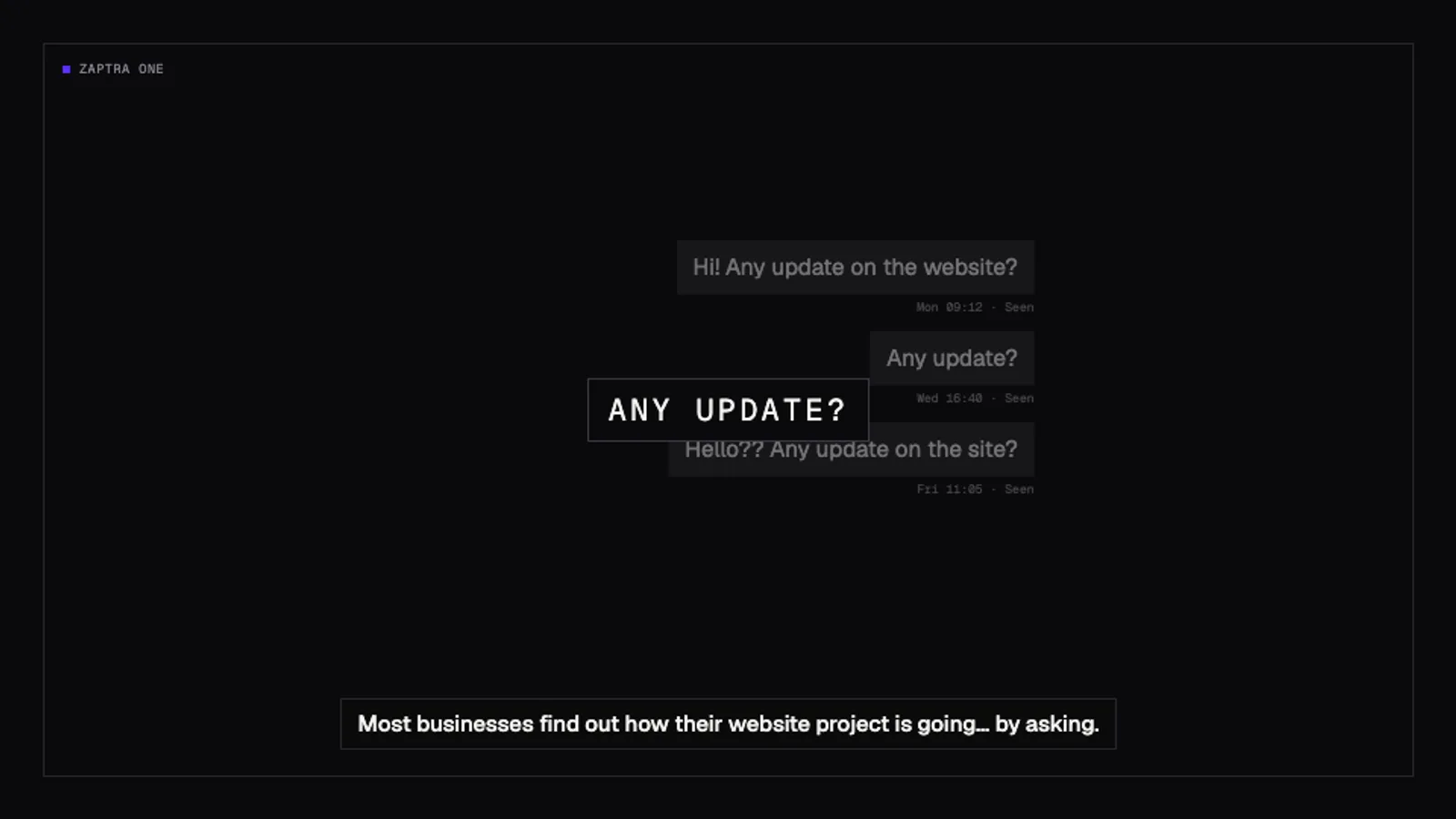
Clients found out how their project was going by asking.
A studio like Zaptra runs dozens of relationships at once. Each one is a website build, a domain, hosting, a few invoices, maybe an instalment plan, and a steady stream of “small changes”. Before Zaptra One, all of that lived in different places: WhatsApp threads, email chains, bank-transfer slips, spreadsheets and people’s memory.
The result was predictable. Clients chased for updates. Designs were approved in a chat message that nobody could find a month later. Payments arrived by bank transfer with no reference. Domains and SSL certificates came close to expiring because the date lived in someone’s head.
There was a business problem underneath the operational one: Zaptra sold one-off projects. Once a site launched, the relationship went quiet until something broke. The studio needed a reason to stay connected — something that made everything it does for a client visible and renewable.
Requirements
What it had to do
We wrote the requirements with Zaptra’s team, from their actual week rather than a feature wishlist. They split into what clients need, what the studio needs, and the constraints that come from where Zaptra works.
For clients
- One login per business, with several people and different roles — owner, finance, marketing, view-only.
- See every project, its progress and its updates without asking.
- Approve designs, or ask for changes, on the record.
- Pay invoices, see what is paid and what is next — including instalments.
- Know that their website, domain and SSL are healthy.
- Ask for work, share files and get the documents and brand assets they own.
For the studio
- Run every client from one control plane: onboarding, projects, invoices, payments, websites.
- Reconcile bank transfers against invoices with an audit trail.
- Get warned before anything lapses — domains, certificates, unpaid instalments.
- Turn the website’s enquiries into leads, and leads into clients.
- Sell services online: a catalogue, quotes, orders and a fulfilment queue.
- Keep support quiet with self-serve help.
Constraints
- Sri Lanka first: prices in LKR, bank transfer before card gateways, phone-first users.
- Two kinds of client: some drive everything themselves, some don’t use computers much. Same system, different driver.
- Multi-tenant from day one, so the platform can serve more than one agency later.
- Lean to run: on the group’s existing infrastructure, with no per-seat SaaS bills.
- Secure enough to hold money and client data.
- Help in English, Sinhala and Tamil.
The approach
One spine. Two apps. One pipeline.
We started with a written blueprint of fifty numbered features (§01–§50) covering the full relationship: discover → quote → build → launch → monitor → grow → renew. Every feature has a status in a living handoff document, and every non-obvious choice is a numbered entry in a decisions log — more than 180 of them so far. That paperwork is what lets one small team, and AI coding agents, move fast without losing the thread.
The architecture follows from one idea: the organisation is the root of everything. Projects, invoices, websites, domains, requests, approvals, documents and notifications all hang off it. Two apps sit on one API — the portal the client sees and the admin Zaptra uses — so there is exactly one source of truth.
The second phase, codenamed IGNITE, moved the product from “show clients what we did” to “take a new customer from I need a website to a live site, domain and business email.” Its rule: one pipeline, two drivers. A capable client drives it themselves; a client who doesn’t use computers gets the same pipeline driven by Zaptra staff on their behalf. Same data, same automation, same billing — only who clicks changes.
- 01Discover
- 02Choose
- 03Sign up
- 04Pay
- 05Brief
- 06Build
- 07Review
- 08Launch
- 09Run
- 10Renew
Every step that still needs a human is an explicit, visible, timed task — and a candidate for automation.— IGNITE north star
Architecture
How the pieces fit
Fig. 4.1 Request path and dependencies. The core API is the only component that touches data or providers.
The core API is a modular monolith. Each business area — organisation, project, billing, launchpay, website, domains, notification, sitebuilder and the rest — is its own package with the same shape: controller, transactional service, repository, DTOs in and out. Entities never leave the service layer. It is one deployable, which keeps operations simple, with module boundaries clean enough to split later if a part needs to scale on its own.
Domain events go through a transactional outbox. When money moves or a domain is registered, the event is written in the same database transaction. A dispatcher claims deliveries with FOR UPDATE SKIP LOCKED, retries with exponential backoff and parks failures where staff can see and retry them. This is the foundation Flowra automations will build on.
Agency
 └─ Organisation
     ├─ User            OWNER · FINANCE · MARKETING · VIEWER
     ├─ Project ─ ProjectUpdate
     ├─ Quote ─ Order ─ FulfilmentTask
     ├─ Invoice ─ Payment
     ├─ PaymentSchedule ─ Instalment   (LaunchPay™)
     ├─ Subscription
     ├─ Domain ◄─ Website ─ Check · Incident
     ├─ Site ─ Version · Generation    (AI sites)
     ├─ Request ─ Activity
     ├─ Approval ─ Round · Message
     ├─ Document  (DOCUMENT | ASSET)
     └─ Notification
StaffUser (belongs to an Agency)Technology
The stack
We picked mature, well-understood tools and spent the novelty on the product.
Infrastructure & delivery
Boring infrastructure, on purpose
Zaptra One runs on TechZap’s own hardened Linux server alongside the group’s other client applications. Each tenant on that server is a separate Linux user running rootless Podman containers managed by systemd (Quadlet), so one application cannot reach another’s files or processes. The database runs natively and listens only on the loopback interface. Caddy is the only thing exposed to the internet, terminating TLS with automatic Let’s Encrypt certificates.
Delivery is fully automated. Every repository has a build workflow on each push and a deploy workflow on main: run the tests, build an image, push it to GitHub’s container registry, SSH in as the tenant’s user, pull and restart. A merge to main is a production release — which is exactly why the tests gate it. A separate staging environment for the API runs alongside production.
Backups are dated, daily and stored off the server in Cloudflare R2 with a fourteen-day retention, plus an encrypted second tier. Uploaded documents never sit on local disk in production — they go to a private R2 bucket and are streamed through the API, so there are no public file URLs to leak.
Honest about the limits. Today this is a single, well-run server, not a cluster. We documented the rebuild and failover path, and moving off a single box is on the roadmap before the platform carries an uptime SLA.
- 01git push mainpull request merged
- 02Build & testMaven verify · Testcontainers Postgres
- 03Container imagemulti-stage build → GHCR
- 04DeploySSH as tenant · podman pull · systemctl restart
- 05MigrateFlyway applies new versions on boot
- 06ServeCaddy · HTTPS · single origin per app
Client portal
The client portal: everything, one login
The portal is what a client sees at one.zaptra.co. It opens on an overview — active projects, monitored websites, uptime, outstanding balance and quick actions — and every area respects the user’s role: finance sees billing, marketing sees delivery, owners see everything.
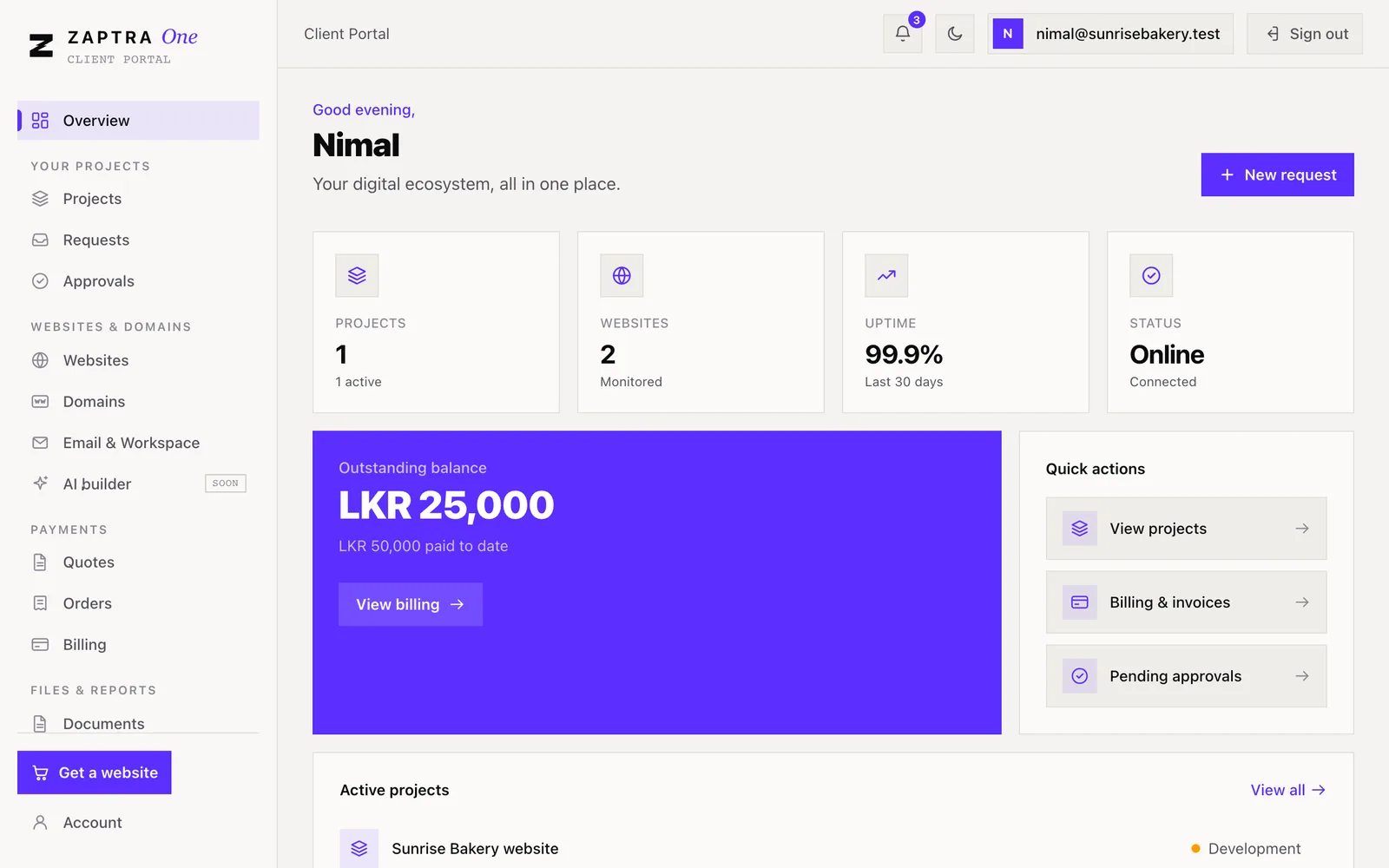
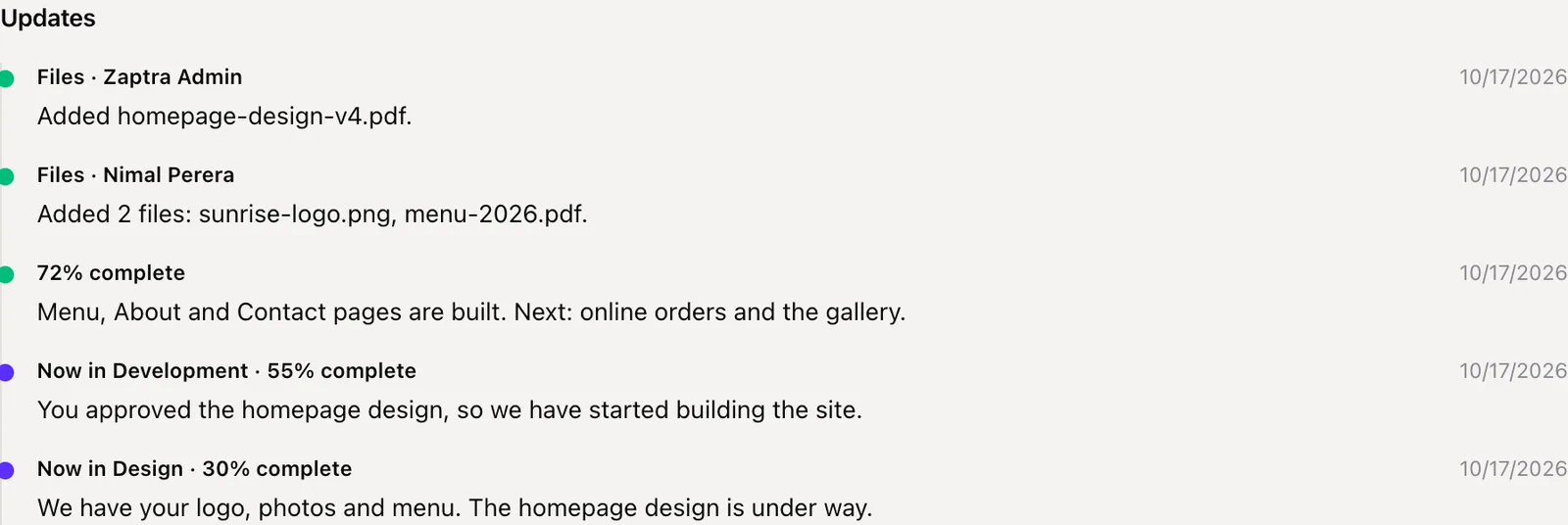
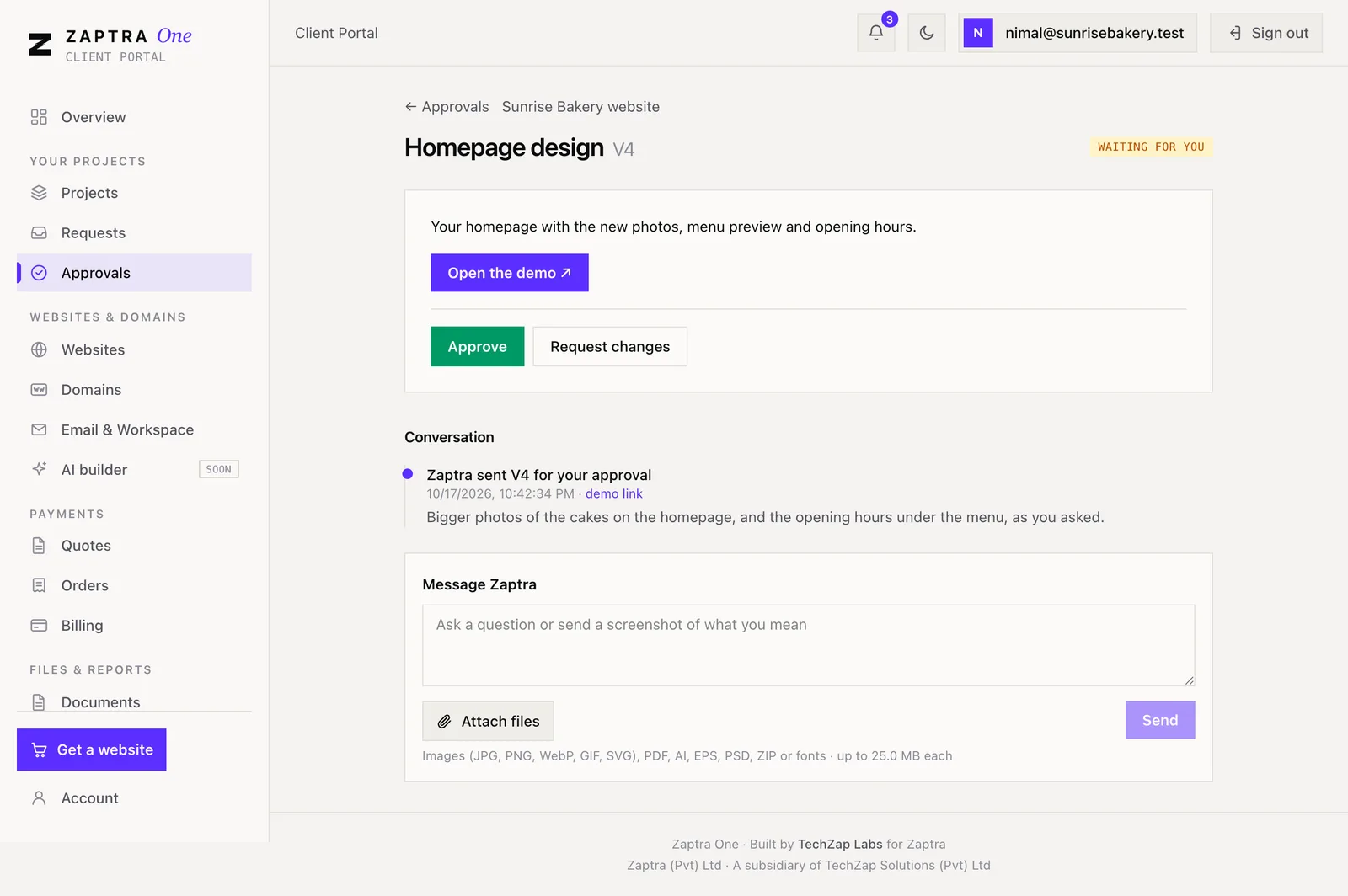
- Projects with progress, links to live and staging sites, files and updates.
- Approvals in rounds, with a threaded conversation and attachments.
- Requests — ask for work with a category and priority, then track it.
- Websites with uptime history, incidents and SSL status.
- Domains — search, buy, or connect one you already own.
- Email & Workspace for business email on their domain.
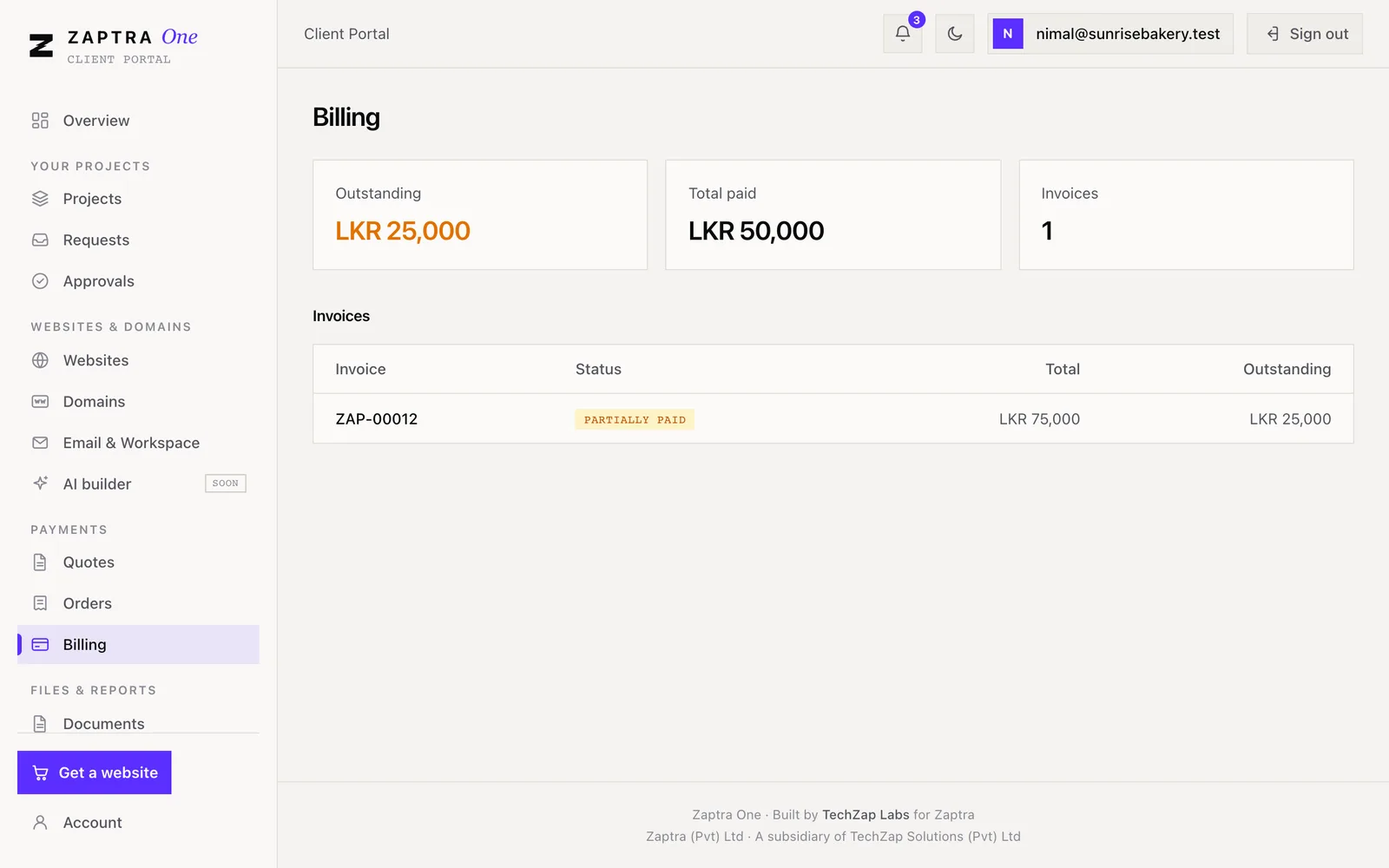
- Quotes, orders and billing, with bank-slip upload and PDF invoices.
- Documents and brand assets, monthly reports and a notification bell.
Admin panel
The admin: a control plane for a studio
The admin is where Zaptra runs the business. It is a separate app with a darker shell, available only to staff, and every staff action is scoped to their own agency. It turned out to be the bigger of the two frontends — about twice the size of the portal — because that is where the operational work lives.
Dashboard
Revenue, outstanding balance, clients, projects, websites and invoices at a glance.
Clients
Every organisation, its team, projects, websites, invoices, approvals and documents on one profile.
Onboarding
Create an organisation and its owner in one atomic step, with a welcome email. Existing clients migrated with their domains and services.
Projects & approvals
Post updates, submit design rounds, attach demos and reply in the thread.
Invoice builder
Line items from the catalogue, discounts, billing types and LaunchPay plans.
Reconciliation
Client-uploaded slips land in a pending queue; staff verify or reject with a reason. Only verified money counts as paid.
Fulfilment queue
Every paid order becomes tasks with an owner, a due date and notes — the automation backlog made visible.
Lead inbox
Enquiries from zaptra.co arrive here, get worked and convert into clients.
Catalogue & pricing
Products, prices, add-ons and domain pricing — the website’s price list reads from here.
Supplier records
What TechZap Infra bought, invoiced and was paid, so intercompany money reconciles.
AI site controls
Usage ledger, cost report, daily caps, abuse reports and takedowns.
Event operations
Failed event deliveries, visible and retryable — nothing fails silently.
Billing & LaunchPay
Money, handled carefully
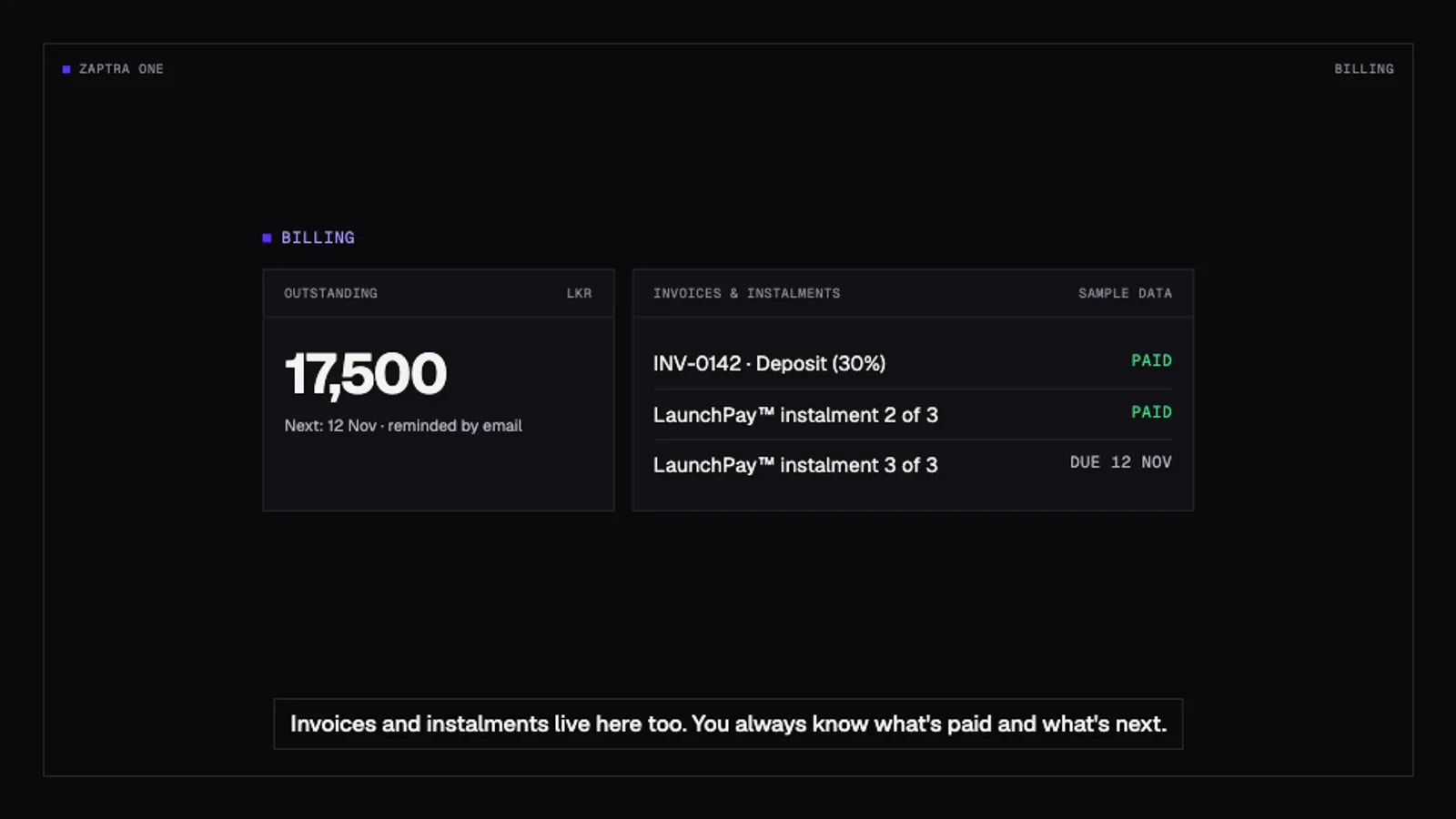
Billing is the part of a client relationship where mistakes cost trust, so it got the strictest rules. Balances are never stored — they are derived from the payment ledger every time. Invoice status (draft, scheduled, partially paid, paid, overdue) is computed from dates and verified payments, not set by hand.
The core supports full payment, pay-as-you-progress, recurring subscriptions and LaunchPay™, Zaptra’s instalment programme: 30% upfront and the rest in equal monthly instalments over three or six months. A plan is a schedule of dated instalments with overdue tracking that completes itself when the last one is paid.
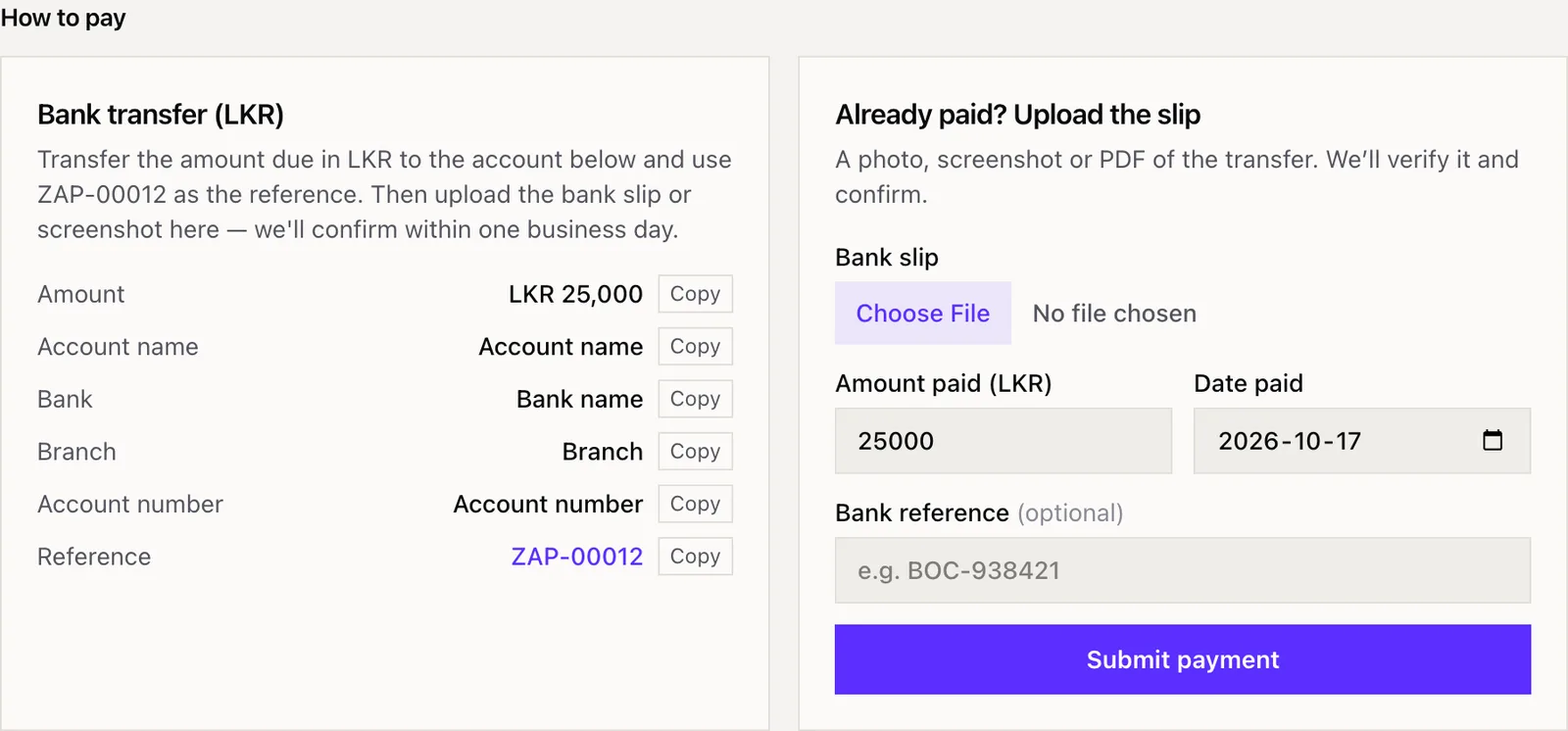
Because most Sri Lankan clients pay by bank transfer, the portal shows the bank details and the invoice number to use as a reference, then takes a photo, screenshot or PDF of the slip. Early in the second phase we found that an unverified payment could already count towards “paid”. That was harmless while only staff recorded payments, but not once clients could upload their own slips — so we fixed it before turning that feature on. Fulfilment is triggered only by verified money, never by invoice status. Anything that moves money takes an Idempotency-Key, so a retry can never charge twice.
Websites & domains
Websites, domains and uptime
Monitoring is self-hosted. A scheduler probes every client website every five minutes, records the response time, works out 30-day uptime and opens an incident when a site goes down. Each check also does a TLS handshake to read the real certificate expiry. Clients and staff are told when a site goes down, when it recovers and before a certificate or domain expires. No third-party monitoring bill, and the data lives next to the rest of the relationship.
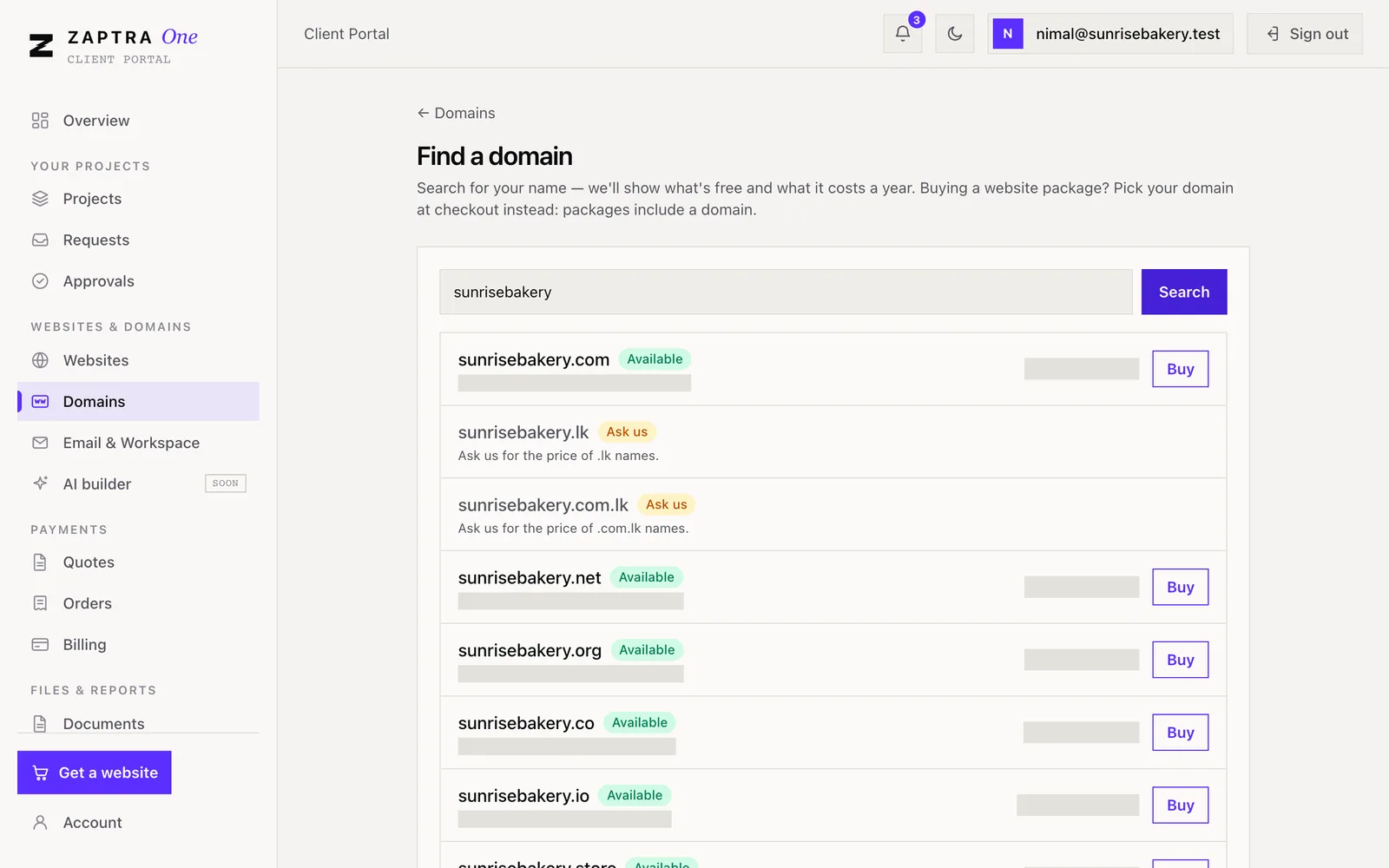
Domains are a first-class part of the product. Clients can search for a name with prices in rupees, buy it at checkout and have it registered in their own name automatically — through TechZap Infra, which holds the registrar account and the Cloudflare DNS. A domain is only registered once payment is verified, and renewals are invoiced thirty days ahead.
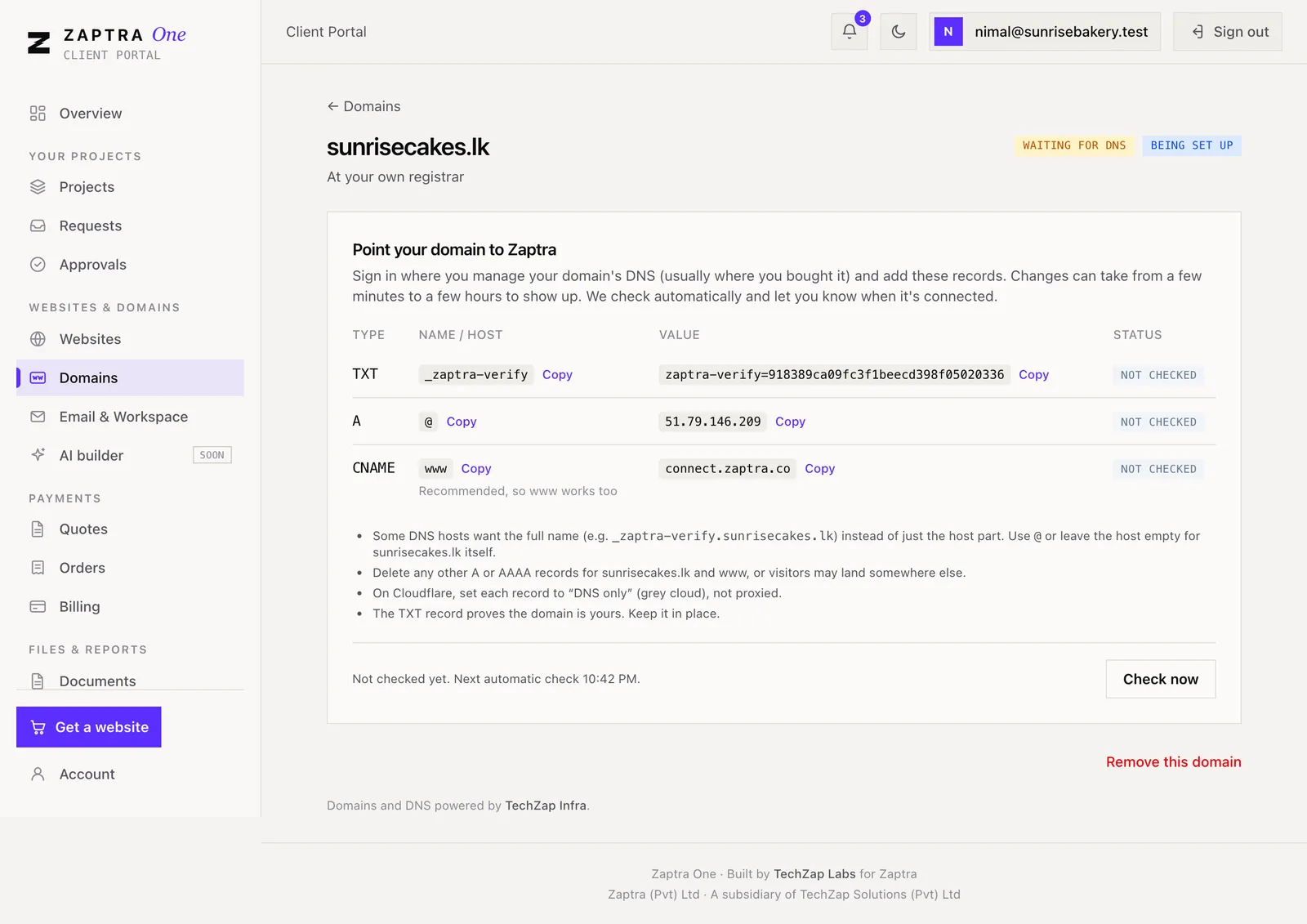
Clients who already own a domain connect it themselves: the portal shows the records to add, checks DNS on a schedule, and Caddy issues a certificate on demand — but only after the core confirms the domain is verified, so nobody can point a random name at us and get a certificate.
Emails & notifications
The product reaches out first
The whole point of Zaptra One is that clients no longer have to ask. So every meaningful event raises a notification: it appears in the portal’s bell, and — unless a dedicated email already covers it — it is emailed from a verified Zaptra address.
Emails share one branded template shell, which also carries a banner Zaptra can change from the admin, so every transactional email doubles as a quiet marketing channel. Sending happens on a background executor, and notifying is deliberately best-effort: a failed email can never break the action that triggered it. Staff get their own alerts — a client replied, a slip was uploaded — in the team inbox.
Phone-number verification for self-serve sign-up goes out by SMS. Email and SMS both sit behind a provider interface: TechZap Infra can send them using the accounts it holds, and switching to a direct provider is a one-line configuration change kept as a rollback.
- Welcome & invitation
- Password reset
- Invoice issued (with PDF)
- Payment received & receipt
- Payment verified or rejected
- Approval requested
- New message on an approval
- Request updated
- Project update posted
- Website down
- Website recovered
- SSL certificate expiring
- Domain expiring
- Domain connected
- Domain connection lost
- Domain registered
- AI site generated
- Renewal invoice due
Security & tenancy
Security is the shape of the code
A ClientOS holds invoices, contracts and access to people’s websites. We treated security as part of the architecture rather than a checklist at the end.
Tenancy, enforced centrally
Every read is scoped by the caller: their organisation for clients, their agency for staff. Anything outside that scope returns 404 — its existence is hidden, not just forbidden. A staff-only annotation alone is never treated as enough.
Roles at two levels
Four client roles (owner, finance, marketing, viewer) and two staff roles, enforced on the server with method-level checks and mirrored in the UI.
Authentication
BCrypt-hashed passwords, stateless JWTs signed with HMAC-SHA256 that expire after an hour. Both apps log out at the exact expiry and re-check when a tab wakes up.
Single-use tokens
Password reset and staff invitations use hashed, time-limited, single-use tokens. Self-serve sign-up is protected by phone OTP.
Rate limits
Every public endpoint — OTP, sign-up, lead forms, domain search — is rate-limited per IP.
Money and provisioning
Idempotency keys, a reconciliation queue with audit (who, when, why), and fulfilment only on verified payments.
Data and secrets
Database on loopback only, a dedicated database role per tenant with default access revoked, secrets only in environment files, documents in a private bucket.
AI that can’t write code
The site builder only chooses blocks, writes copy and sets a theme — validated against a JSON schema. No raw HTML or scripts, reserved names, no-index previews, abuse reports and takedowns.
Quality & operations
Tests that gate production
The backend’s integration tests boot the whole application against a real PostgreSQL in a throwaway container (Testcontainers), apply every migration, and exercise real HTTP requests. They cover authentication, tenancy isolation — another organisation’s data must be a 404 — and billing invariants. CI runs them on every push, and the deploy job will not ship if they fail.
New endpoints follow written API standards from day one: pagination on every list, filtering and sorting in the database against a whitelist, an index for every filtered column, no N+1 queries, validation at the edge, a consistent error shape, and an integration test covering the happy path, tenancy and validation.
Operations are documented as runbooks: deploying, migrating, rotating keys, restoring backups. The product’s own state — failed event deliveries, the fulfilment queue, AI spend — is visible to staff in the admin rather than buried in logs.
Every new endpoint
- Paginated, max 100 per page
- Filtered & sorted in SQL, whitelisted
- Indexed in the same migration
- No N+1 — fetch joins or entity graphs
- Scoped by the current user
- Idempotent if it moves money
- Rate-limited if it is public
- Audited if it changes money or access
- Integration-tested, including tenancy
The AI site builder · in development
From brief to website, with guardrails
The flagship of IGNITE is a self-serve path: a business answers a short brief, uploads its logo and photos, and has a short chat interview. A Claude model then produces a structured site definition — which blocks, in what order, with what copy and theme — that is validated against a JSON schema and stored as a version. A separate renderer serves it by host name at a preview address, and later on the client’s own domain.
The design choice that matters: the model never writes code. It picks from a library of blocks (hero, services, gallery, testimonials, contact with map and WhatsApp, and so on), so a generated site is fast, consistent, safe and editable section by section. Every generation is logged with its token cost per organisation, there are daily caps, and a single switch stops all new AI calls.
After the preview, a client chooses a lane: publish the AI site on a plan, publish and buy fixed-price tweaks from Zaptra’s team, or go fully handcrafted — in which case the brief and draft replace the discovery call. It is running in staging today.
Documentation & help
Documentation is part of done
Two audiences, two kinds of documentation. For engineers: the blueprint (what the product is), the handoff (what is built and what is next), the vision and decisions log (why), runbooks, and API conventions. They are written so a new developer — or an AI agent — can pick up the work from one place.
For clients: a public help centre at help.zaptra.co, built with Astro Starlight and full-text search. Articles cover signing in, roles, following a project, approving work, asking for changes, sharing files, quotes, paying invoices, domains and business email — in English, Sinhala and Tamil.
The rule for every article: only describe what the portal actually does, checked against the screen or the code. Screenshots come from a local copy of Zaptra One seeded with a fictional client, “Sunrise Bakery” — the capture script refuses to run against anything but localhost, so no real client data can end up in public docs. When the portal changes, the screenshots are re-captured by script.
Film & YouTube
Promoting it with Zaptra, on YouTube
A product nobody understands doesn’t sell. Labs and Zaptra made the video side together: Zaptra owns the story and the channel, Labs builds the films — in code, with Remotion — so they can be re-cut whenever the product changes.
The Zaptra One film comes in a 90-second explainer, a 30-second cut and a 15-second vertical for Shorts and Reels. Captions are burned in so it works muted in a feed. The music is original, composed in code on a 120 BPM grid so every hit lands on a cut — we own it outright.
Alongside it is a how-to series, published on Zaptra’s YouTube channel: paying an invoice, approving your website, asking for a change and accepting a quote. Each is recorded from the seeded demo by script, narrated, subtitled in English, Sinhala and Tamil, and linked to its help article. The same toolkit produced Zaptra’s brand promo, its rebrand film and the LaunchPay™ campaign.
How to pay an invoice in Zaptra One · on Zaptra’s YouTube channel
Outcomes
What it changed
From one-off projects to a relationship
Every Zaptra client now has a place where their projects, websites, domains, invoices and documents live together — the basis for recurring services and renewals.
From asking to knowing
Progress, approvals and payments are visible without a message. Clients are told when something happens — including when their site goes down.
From inboxes to queues
Leads, slips, requests and fulfilment tasks each have a queue, an owner and a state. What still needs a human is visible — and next in line to be automated.
A showcase for the whole group
Zaptra’s product and service, Labs’ engineering, Infra’s platform — and the base for Flowra’s automations and ZENTIQ’s AI.
Roadmap
What’s next
- Building
AI site builder — from staging to production, with the three lanes and the tweak menu.
- Planned
Card payments — a gateway provider beside bank transfer, so “instant” becomes real.
- Planned
Money on autopilot — auto-invoicing each subscription cycle and instalment reminders.
- Planned
Workspace provisioning — Google Workspace and Microsoft 365 through partner APIs.
- Planned
Zaptra AI — an assistant grounded in each organisation’s own data: what do I owe, is my site healthy, where is my project.
- Planned
Flowra automations — onboarding checklists, overdue nudges and incident escalations on the event stream.
- Planned
Beyond one server — external monitoring, a public status page and a tested multi-node setup.
Credits
Product owner: Zaptra. Design, engineering, infrastructure, documentation and film: TechZap Labs. Provider platform: TechZap Infra. All screens in this study show sample data.